

Discord Token Login – Ozeu Chan Edition | Manage Tokens Easily
taka-4602
Cara Install Ekstensi Chrome
- Klik tombol "Add to Chrome" di atas.
- Anda akan diarahkan ke Chrome Web Store.
- Klik "Add to Chrome" pada halaman ekstensi.
- Konfirmasi dengan klik "Add Extension" pada popup.
- Ekstensi akan otomatis terpasang dan ikon muncul di toolbar.
- Klik ikon ekstensi di toolbar untuk mulai menggunakan.
Screenshot
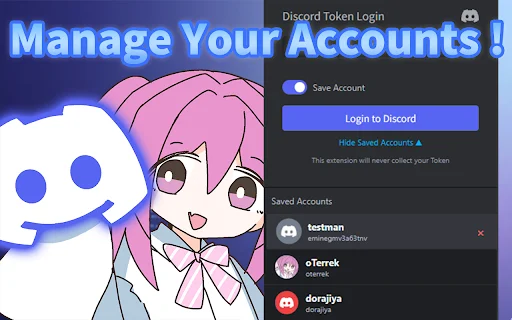
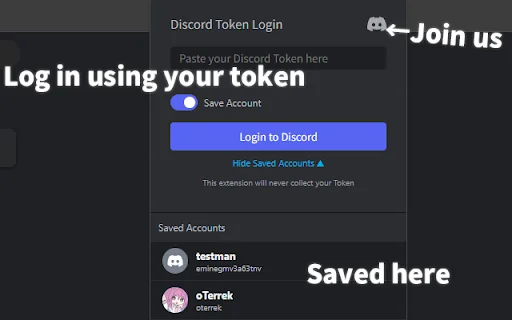
Are you tired of constantly logging in and out of your multiple Discord accounts? Managing secondary accounts or testing different sessions can become a cumbersome task if you rely solely on the traditional login method. Discord Token Login – Ozeu Chan Edition is here to streamline your experience, allowing you to switch between accounts instantly using your Access Token without needing to re-enter credentials every time.
Designed for power users and developers, this extension offers a lightweight and secure way to handle your Discord sessions. With the charming interface featuring the Ozeu-Chan mascot, you can keep your workflow organized and efficient. Whether you are managing community servers, testing bot environments, or simply juggling personal and professional profiles, this tool provides the ultimate shortcut for seamless Discord access.
Key Features
- Instant login to Discord using your personal Access Token.
- Effortless account switching for managing multiple Discord profiles.
- Secure storage and organization of your saved tokens.
- Lightweight browser extension design that won’t slow down your system.
- Cute and unique UI featuring the official Ozeu-Chan mascot.
- Open-source code available on GitHub for transparency and community review.
- Simplified interface that removes unnecessary login friction.
- Ideal for developers and power users who need frequent session access.
How to Use
- Install the Discord Token Login – Ozeu Chan Edition extension from the Chrome Web Store.
- Click on the extension icon in your browser toolbar to open the management panel.
- Paste your valid Discord Access Token into the designated input field.
- Click the login button to be instantly authenticated into your account.
- Manage your saved tokens directly through the extension interface for future quick access.
FAQ
Is it safe to use Discord Token Login extensions?
This extension is open-source, allowing you to review the code on GitHub. Always ensure you only use tokens you generate yourself and never share them with others.
What is an Access Token?
An Access Token is a unique string that authenticates your Discord session without requiring a password. It is intended for advanced users and developers.
Can I save multiple tokens?
Yes, the extension is designed to help you manage and save multiple accounts for easy switching.
Who is Ozeu-Chan?
Ozeu-Chan is the mascot character featured in this extension. You can learn more about the character at the official ozeu.net website.
Where can I report issues or suggest features?
Since the project is open-source, you can submit issues or feature requests directly through the official GitHub repository provided.
Take control of your Discord sessions today. Experience the convenience of rapid account switching and efficient token management with Ozeu-Chan. Click the download button to install Discord Token Login – Ozeu Chan Edition and optimize your productivity now!
Users appreciate the convenience for managing multiple accounts and the cute aesthetic, though some express concerns regarding the development background.
Kelebihan
- Convenient for managing sub-accounts
- Cute mascot design
Kekurangan
- Negative perception of the developer's background
Ulasan Pengguna
It is garbage because it was made by a raid server group.
Extremely convenient for sub-accounts.
The images are cute.
| ID Ekstensi | hclmkpmnkhpplnpmncmlenmjnemjbdgh |
|---|---|
| Version | 1.1 |
| Size | 0.0 MB |
| Developer | taka-4602 |
| Terakhir Diperbarui | |
| Tanggal Rilis | |
| Jumlah Pengguna | 1.000++ |
| Jumlah Ulasan | 6 |
| Chrome Store Ranking | #29066 |
| Category | Productivity |
| Tipe | Free |

Orchid eBound – NICS Integration ডাউনলোড করুন – দ্রুত ডাটা এন্ট্রি
Orchid Advisors, LLC

Bell Countdown Extension ডাউনলোড করুন – স্কুলের সময়সূচী ট্র্যাকার
https://bell.plus

Praxis Sports ডাউনলোড করুন – সেরা স্পোর্টস ম্যানেজমেন্ট প্ল্যাটফর্ম
Praxis Tech

Ritmo ডাউনলোড করুন – ব্রাউজার অডিও ক্যাপচার ও BPM ডিটেক্টর
https://vrsm.cc

Jil Banawe ডাউনলোড করুন – অনলাইন প্রাইস লিস্ট ও স্টক চেক অ্যাপ
ArgzDev

SwipeTube ডাউনলোড করুন – YouTube বিজ্ঞাপন ট্র্যাক ও অ্যানালাইসিস টুল
https://swipetube.io